
In this guide, we’ll cover how to spoof the PID (Product ID) and VID (Vendor ID) on your KMbox NET.

But first, lets go over why you need to spoof the VID and PID of KMbox NET to avoid aimbot detection
When using the KMbox NET, especially in competitive gaming environments, spoofing the VID (Vendor ID) and PID (Product ID) is crucial for avoiding detection, particularly if you’re running an aimbot. Here’s why this step is essential:
1. Preventing Aimbot Detection
Anti-cheat systems often scan connected devices for suspicious activity, including detecting hardware identifiers like VID and PID. If your KMbox NET’s default identifiers are recognized as associated with aimbot hardware, it could lead to detection and potential bans. Spoofing these identifiers to match those of a standard, non-suspicious device (like a regular mouse) helps you evade these scans.
2. Post-Firmware Flashing Protection
After flashing new firmware onto your KMbox NET, the VID and PID might reset to their defaults, making your device easier to identify as unauthorized. Spoofing these IDs after every firmware update ensures that your device continues to operate under the radar, protecting you from detection by anti-cheat software.
3. New Device Security
When you first receive your KMbox NET, it comes with factory-set VID and PID, which might be flagged by anti-cheat systems. Spoofing these identifiers right after unboxing allows you to use the device without triggering detection mechanisms designed to spot unauthorized hardware.
Spoofing the VID and PID of your KMbox NET is a critical step in avoiding detection while using an aimbot. Whether you’re setting up a new device or updating firmware, this process helps ensure that your device remains undetected by anti-cheat systems, keeping your gaming experience uninterrupted.
Follow these steps to complete the spoofing process.
Step 1: Download USB Log View
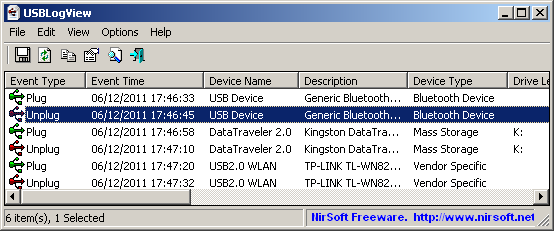
- Access the USB Log View Tool
- Start by clicking on the first link in the description. This will take you to the Noft website.
- Scroll down to find the Download USB Log View button and click on it.
- Download and Unzip
- Download the USB Log View tool.
- Once the download is complete, unzip the file.
- Run USB Log View
- Open the unzipped folder and run the
exefile inside it. - Maximize the program window to full screen.
- Open the unzipped folder and run the
Step 2: Identify Your Mouse’s VID and PID
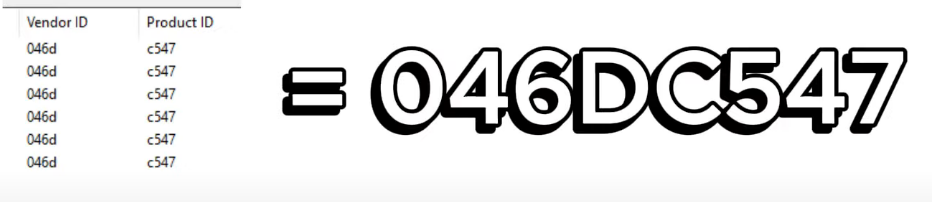
- Reconnect Your Mouse
- Unplug your mouse from your computer and then plug it back in.
- Locate VID and PID
- The USB Log View tool will display the VID and PID for your mouse. Write these down as you’ll need them later.
Step 3: Set Up the KMbox NET Tool on Your Second PC
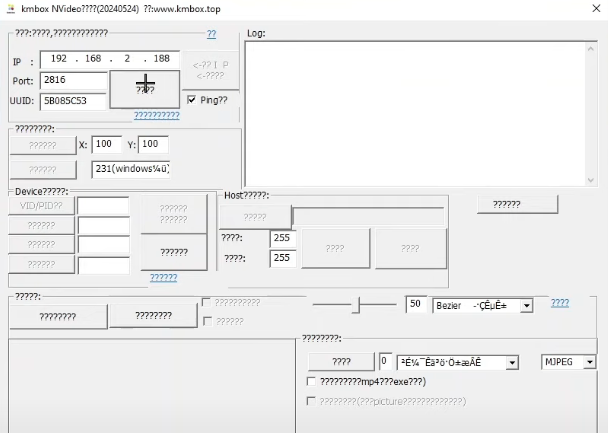
- Download the KMbox NET Tool
- On your second PC, click on this link to download the KMbox NET tool.
- Unzip the file and open the
exefile inside the unzipped folder.
- Enter KMbox NET Details
- In the tool, input your KMbox NET’s IP, port, and UUID.
- Check the small ping box and click on the large button next to it.
- If a popup appears indicating a successful ping, you can proceed. If it doesn’t connect, try restarting the KMbox NET by unplugging it from your main PC and plugging it back in. You may also need to run the
exeas an administrator.
- Enter the VID and PID
- Enter the VID and PID you saved earlier on the left side of the tool.
- Click the button to spoof the values. A popup will confirm the spoofing is successful.
Step 4: Verify the KMbox Spoof on Your Main PC
- Reconnect KMbox NET
- Go back to your main PC and open USB Log View again.
- Unplug and replug your KMbox NET. It should now display the same VID and PID as your mouse.
- Confirmation
- If the VID and PID match, you’ve successfully spoofed your KMbox NET.
If you encounter any issues or have further questions, feel free to reach out on Discord. The tag is provided in the video description.
Want To Get Started With DMA Cheats?
Click Here to Join our exclusive Discord community to get started cheating in your favorite video games!
- SUPPORT: Get personal help and tips directly from me
- COMMUNITY: Connect with fellow DMA gamers and find teammates
- UPDATES: Be the first to know about new updates and features