
How To Spoof KMBox B+ Pro Pid & Vid (DMA Aimbot) RECOMMENDED, yet optional
KMbox B+ Pro Spoof Video Guide
Instructions on changing VID/PID for your KMBox B+ Pro
1) Download uPyCraft in 2nd PC (cheat pc)
https://randomnerdtutorials.com/uPyCraftWindows

2) Open it, press cancel on the font download
Then go to Tools -> Serials and choose the COM port.
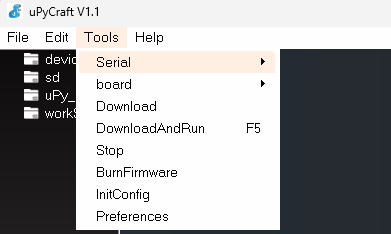
If you get error such that you have no permission for it, unplug the COM and PC USB cable in KMBox b+ and re-plug them in. Then retry. If there is no COM port found, install the driver.
3) Locate the Vendor ID (VID) and Product ID (PID)
To do this, open the Device Manager on your PC. Navigate to the mouse section, then disconnect your kmbox and any other mice or keyboards connected to your PC, leaving only the primary mouse you use. Right-click on your mouse and select Properties.

Go to the Details tab and choose Hardware IDs from the drop-down menu. You will see entries like VID_XXXX and PID_XXXX, where XXXX represents the hexadecimal numbers specific to your mouse (e.g., 13AC). Here are some screenshots for reference:


4) Open the Boot.py file in uPyCraft.
In the top-left corner, click File then open the boot.py file. Scroll down until you find the VID and PID lines. If there is a # symbol before them, remove it. Enter your VID and PID values there. Press Ctrl + S to save the changes. Then, type the command km.reboot() in the window below.

You have now successfully spoofed your KMBox, good job!
ADVICE: Always plug your mouse into the kmbox port for safety; do not plug it directly into your PC.
IMPORTANT: DO NOT UNPLUG CALBES WHEN IT’S DOWNLOAD/REBOOTING.
Want To Get Started With DMA Cheats?
Click Here to Join our exclusive Discord community to get started cheating in your favorite video games!
- SUPPORT: Get personal help and tips directly from me
- COMMUNITY: Connect with fellow DMA gamers and find teammates
- UPDATES: Be the first to know about new updates and features