
Have you been waiting to use makcu for controllers? The Makcu is making waves, especially with its new firmware that lets you use your favorite controllers without needing a XIM Matrix. Yeah, you heard that right! The “Macku for controllers” community is all about getting your gear to work seamlessly, and this is a game-changer for custom setups.
Now, here’s the deal: unlike its chill cousin Makxd (more on that later!), the current Makcu board needs a little love. You gotta flash some custom firmware (FW) on it to really unlock its beast mode.
This isn’t just for kicks; it’s essential to get the board talking to all sorts of controllers and, crucially, for your game software to actually see and use those sweet APIs. It’s all about getting hands-on and building a setup that’s uniquely yours.
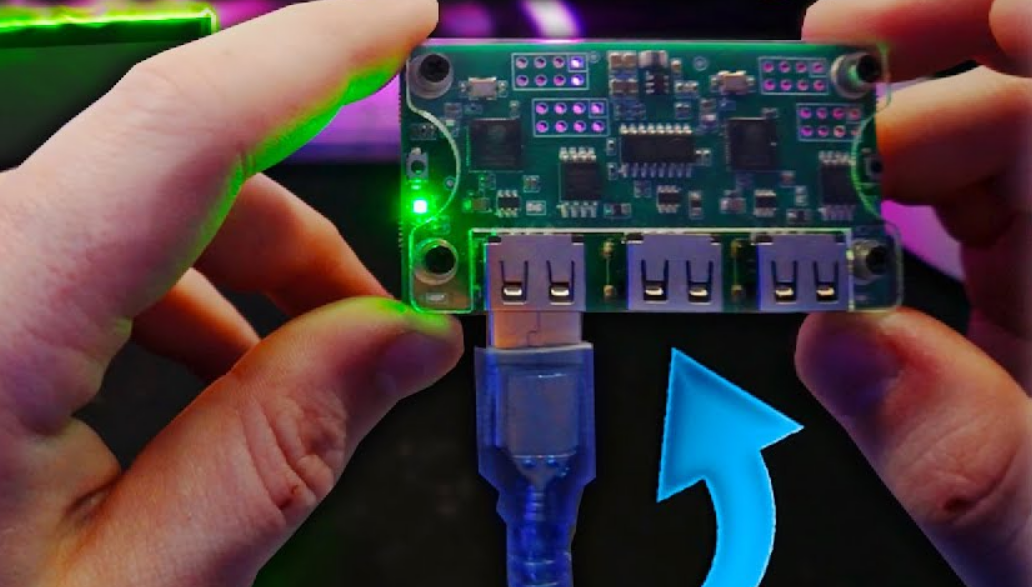
Makcu for Controllers
The “Macku for controllers” crew has been grinding, testing out a bunch of popular controllers to see what plays nice with Makcu. This is super helpful for anyone trying to figure out if their go-to pad will work. Check out the confirmed winners:
| Controller Type | Status |
| PS4 Controller | Works like a charm! |
| PowerA Series X Wired | Solid! |
| Regular Xbox Controller | Yep, good to go! |
| Gamesir G7 SE & Pro | Flawless victory! |
Seriously, these controllers are all vibing perfectly with the Makcu board, proving that a little custom FW can go a long way in making everything compatible.
Still in the Lab: Controllers Under Test
But the mission isn’t over! The community is always pushing boundaries, and we’ve got some controllers still in the testing phase. If you’ve got one of these, jump in and help us out! Every bit of info helps us grow the Makcu fam:
| Controller Type | Status |
| PS5 Controller | Needs more testing! |
| Scuf Controller | Still checking it out! |
If you own a PS5 or Scuf controller and you’re feeling adventurous, hit up the community! Your input could be key to getting these officially supported.
The Hook-Up: USB Setup Deets
Getting your Makcu setup just right means paying attention to your USB connections. We’re not diving into a full-blown tutorial here (this is a news article, not a how-to!), but here’s the quick rundown on how things generally connect for peak performance:
•Your Controller: Plug it into a USB 3 port for that sweet, fast connection.
•Software Side: Use a USB 2 port for your software connections.
•Your Rig (PC/P5Mate/PS5): Connect that bad boy to a USB 1 port.
This specific setup helps make sure everything’s talking smoothly and getting enough juice to keep your game running without a hitch.
Looking Ahead: The Makxd Hype is Real!
While Makcu is doing its thing and letting us customize like crazy, get ready for the next big wave: Makxd! It’s dropping in just a few weeks, and the hype is totally justified. Makxd is looking to make things even smoother, probably cutting down on the need for all that custom firmware flashing and bringing a ton of out-of-the-box support for even more controllers.
It’s like Makcu laid the groundwork, and Makxd is building a skyscraper on top of it. We’re all buzzing to see how it simplifies controller hook-ups and makes gaming even more accessible and awesome for everyone. Get ready for a serious upgrade to your setup!
Want To Get Started With DMA Cheats?
Click Here to Join our exclusive Discord community to get started cheating in your favorite video games!
- COMMUNITY: Connect with fellow DMA gamers and find teammates
- UPDATES: Be the first to know about new updates and features
- SUPPORT: Get personal help and tips directly from me